Golden Scale
A Transform panel for Adobe Illustrator where every size is a Fibonacci number or a golden-ratio step.
What it does
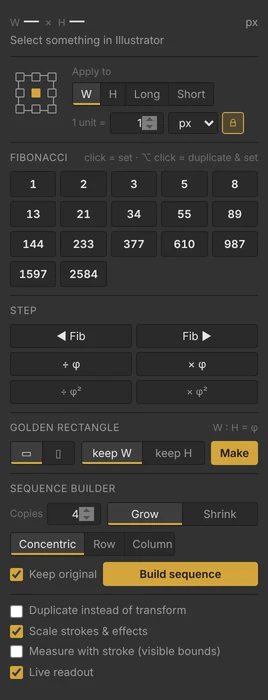
Golden Scale works like Illustrator’s Transform panel, but every size is a Fibonacci number (1, 2, 3, 5, 8, 13…) or a step of the golden ratio.
Pick a reference point, click a number, and the selection is that size. It also makes golden rectangles and builds a whole sequence of copies from one shape.
Why I built it
I kept typing Fibonacci and golden-ratio sizes into the Transform panel by hand, and working out 1.618 times whatever I had. Now it’s one click.
Features
- A live W × H readout that tells you whether the size is a Fibonacci number, or which one is nearest, and whether it’s already a golden rectangle.
- A 3×3 reference point, the same as the Transform panel.
- Apply to the width, the height, the longer side or the shorter side, with proportions locked or not.
- A “1 unit =” multiplier in px, pt, mm, cm or in, so 8 can mean 80 px.
- Fibonacci buttons from 1 to 2584. ⌥/Alt-click any of them to duplicate first.
- Step to the previous or next Fibonacci size, or multiply or divide by φ and φ².
- Turn a selection into a golden rectangle, wide or tall, keeping its width or its height.
- Build the next sizes of the sequence as copies: growing or shrinking, nested on one point, in a row or in a column.
- Options to work on a copy, scale strokes and effects, and measure with the stroke included.
- Every action is a normal Illustrator transform, so ⌘Z undoes it.
Get it
Works in Illustrator CC 2019 and newer, on macOS and Windows. Version 1.0.1, MIT license.
Install on a Mac
- Unzip, then double-click Install Golden Scale (Mac).command. If macOS blocks it, right-click it and choose Open.
- Quit Illustrator and open it again.
- Open the panel from Window → Extensions → Golden Scale.
Install on Windows
Run Install Golden Scale (Windows).bat, restart Illustrator, then Window → Extensions → Golden Scale.
What the installer changes
Golden Scale is a free, home-made panel, so it isn’t signed through Adobe. To make Illustrator load it, the installer:
- copies the GoldenScale folder into your user’s Adobe CEP extensions folder (no admin password);
- turns on Adobe’s PlayerDebugMode setting (CSXS 9–14), which lets Illustrator load panels that aren’t signed through Adobe. It’s a per-user setting, and it applies to every unsigned panel, not only this one;
- on macOS, removes the download-quarantine flag from the copied folder so Gatekeeper doesn’t block it.
It doesn’t connect to the internet, collect data, or need admin rights.
Uninstall
Run Uninstall Golden Scale (Mac).command or Uninstall Golden Scale (Windows).bat, or delete the GoldenScale folder from your CEP extensions folder. The uninstaller leaves PlayerDebugMode on, because other panels may need it. To turn it off on a Mac, run this in Terminal:
for v in 9 10 11 12 13 14; do defaults delete com.adobe.CSXS.$v PlayerDebugMode; done