Smooth Corners
Figma-style smooth corners for Adobe Illustrator, on any shape and any angle.
What it does
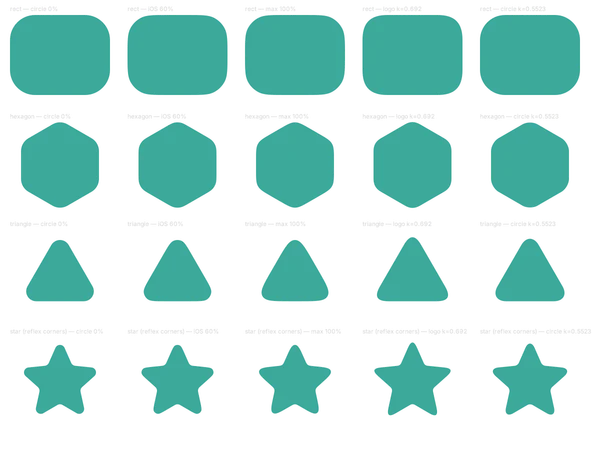
Smooth Corners rounds corners in Illustrator the way Figma and iOS do. The curve starts gently at the straight edge and tightens toward the middle of the corner. A circle starts at full curve right away.
It works on any corner between two straight edges: triangles, hexagons, stars, corners that point inward. When you scale a shape, it redraws the corners at the right radius so they don’t stretch.
Why I built it
Illustrator’s round corners are perfect circles. Put one next to an iOS icon or a Figma frame and you can see where the straight edge stops and the arc starts. I was drawing smooth corners by hand, point by point, until I built this.
Features
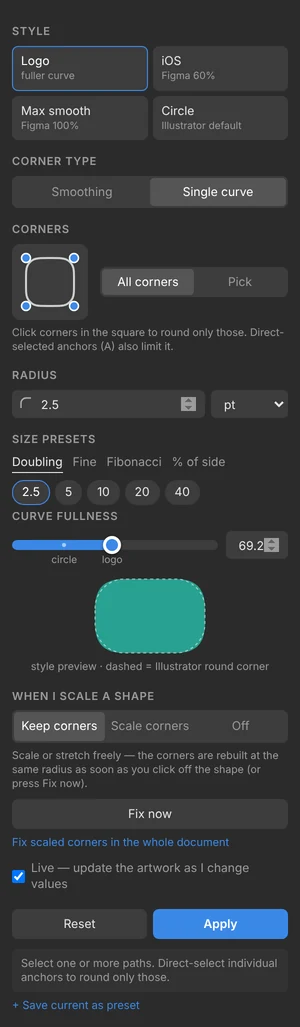
- Four styles: Logo (a fuller corner), iOS (Figma’s 60% smoothing), Max smooth (Figma’s 100%) and Circle (Illustrator’s own).
- Size presets that double (2.5, 5, 10, 20, 40), fine steps, Fibonacci, or a percentage of the shape’s shortest side. You can save your own, too.
- Round every corner, click the ones you want on a little square, or direct-select the anchors.
- Give each corner its own radius, like Figma’s independent corners.
- Any angle: triangles, hexagons, stars, inward corners. On a short edge the radius shrinks so corners never overlap.
- Curved points and curved segments are left exactly as they are.
- When you scale a shape, keep the corners at their size, scale them evenly, or leave it to Illustrator.
- Select a rounded shape and the panel shows its settings, the way Figma shows a layer’s radius.
- Change or reset it any time. The original shape is kept in the path’s Note, so rounds never stack up.
- A dockable panel with live preview, plus a stand-alone script for File → Scripts.
How the math works
In smoothing mode each corner is a circular arc that covers (1 − smoothing) of the turn. On each side of it, a cubic Bézier eases the curvature from zero at the straight edge up to the arc’s. The corner reaches r·tan(θ/2)·(1 + smoothing) along each edge.
That’s Figma’s construction, extended from 90° to any angle. At 90° it matches Figma’s published numbers to within 1e-5.
Logo mode draws one cubic per corner, with handles at 69.2% of the corner length where a circle uses 55.2%. It comes out fuller at the middle and meets the edges more gently.
Get it
Works in Illustrator 2024, 2025 and 2026, on macOS and Windows. Version 1.3.4, MIT license. Adobe plans to retire CEP panels in favor of UXP; the standalone .jsx script isn’t affected.
Install on a Mac
- Unzip, then double-click Install Smooth Corners (Mac).command. If macOS blocks it, right-click it and choose Open.
- Quit Illustrator and open it again.
- Open the panel from Window → Extensions → Smooth Corners.
Install on Windows
Run Install Smooth Corners (Windows).bat, restart Illustrator, then Window → Extensions → Smooth Corners.
On a Mac, the installer also tries to add the dialog version to File → Scripts. If it can’t, or you’re on Windows, run it from File → Scripts → Other Script… → SmoothCorners.jsx.
What the installer changes
Smooth Corners is a free, home-made panel, so it isn’t signed through Adobe. To make Illustrator load it, the installer:
- copies the panel into your user’s Adobe CEP extensions folder (no admin password);
- turns on Adobe’s PlayerDebugMode setting (CSXS 9–14), which lets Illustrator load panels that aren’t signed through Adobe. It’s a per-user setting, and it applies to every unsigned panel, not only this one;
- on macOS, removes the download-quarantine flag from the copied panel folder so Gatekeeper doesn’t block it;
- on macOS, tries to copy the two .jsx scripts into Illustrator’s Scripts folder.
It doesn’t connect to the internet, collect data, or need admin rights.
Uninstall
Run Uninstall Smooth Corners (Mac).command or Uninstall Smooth Corners (Windows).bat. The uninstaller leaves PlayerDebugMode on, because other panels may need it. To turn it off on a Mac, run this in Terminal:
for v in 9 10 11 12 13 14; do defaults delete com.adobe.CSXS.$v PlayerDebugMode; done